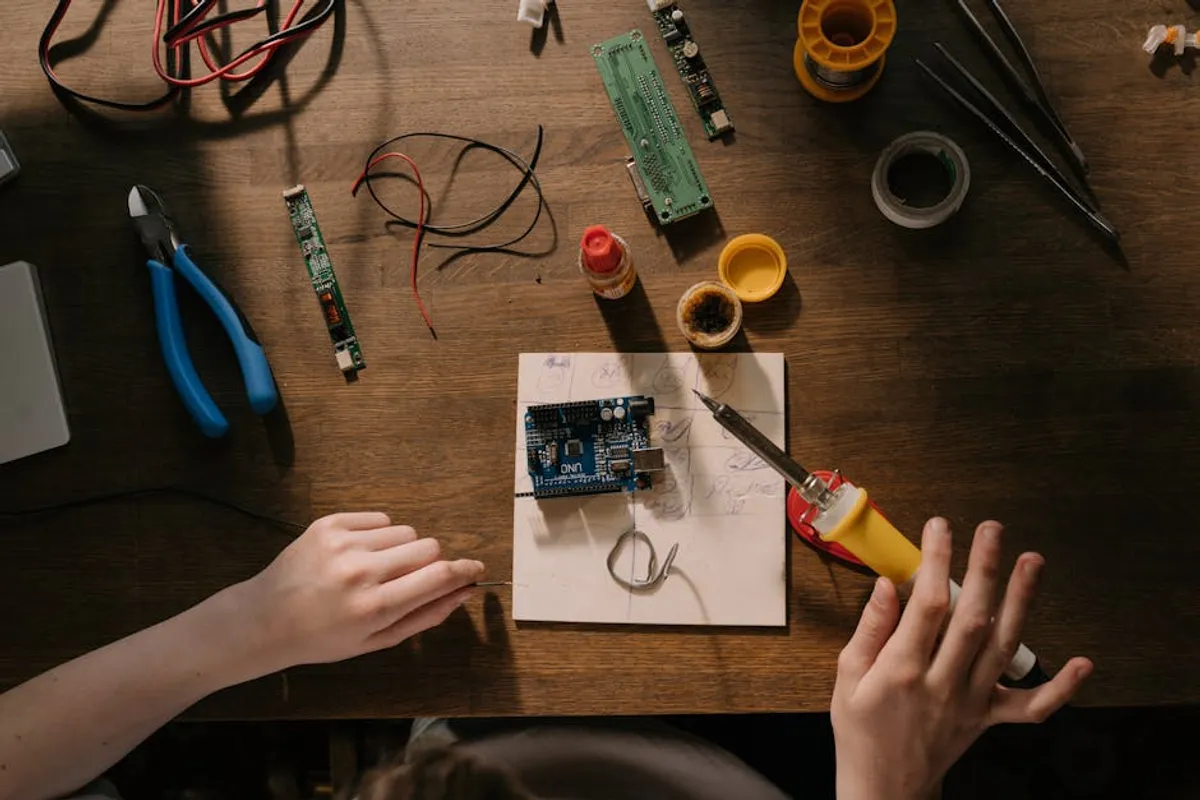
Building a functional DIY electronics workbench requires a strategic selection of tools. The right equipment enhances precision, improves efficiency, and ensures safety, transforming complex projects into manageable tasks. Conversely, inadequate tools lead to frustration, damaged components, and potentially unsafe working conditions. This guide outlines the essential tools every serious electronics hobbyist or professional needs, focusing on their specific applications, benefits, and limitations to help you make informed decisions for your setup.
Key Considerations for Your DIY Electronics Workbench
Before investing in individual tools, assess your current needs and future aspirations. The ideal workbench setup balances budget, project scope, and available space. Consider the types of projects you anticipate undertaking—are they primarily through-hole, surface-mount, or a mix? Do you need to diagnose complex circuits, or are you focused on assembly? Your skill level also dictates initial investments; beginners might prioritize foundational tools, while experienced users may require more specialized diagnostic equipment. Evaluate tool features like temperature stability for soldering, measurement accuracy for multimeters, and bandwidth for oscilloscopes. Durability and ergonomic design also contribute to long-term usability and comfort.
1. Soldering Station
A dedicated soldering station provides precise temperature control, crucial for working with various components and solder types. Unlike basic soldering irons, stations offer thermal stability, preventing component damage from overheating and ensuring strong, reliable joints. They typically feature a base unit with controls, a temperature-controlled iron, and a stand with a cleaning sponge or brass wool. Advanced models include digital displays, programmable temperature profiles, and compatibility with different tip geometries for specialized tasks.
Best for: Assembling PCBs, repairing electronic devices, desoldering components, working with both through-hole and surface-mount technologies (SMT) where precise heat application is critical.
Pros:
- Accurate and stable temperature control minimizes thermal stress on sensitive components.
- Interchangeable tips accommodate a wide range of soldering applications, from fine-pitch SMT to larger wire connections.
- Ergonomic handles and flexible cords reduce user fatigue during extended work sessions.
- Safety features like automatic sleep modes and grounding protect both the user and components from static discharge.
Cons:
- Higher initial cost compared to basic plug-in soldering irons.
- Requires periodic tip cleaning and replacement, adding to ongoing maintenance.
- Some budget models may have slower heat recovery, impacting efficiency during continuous soldering.
Verdict: An indispensable core tool for any electronics workbench, offering control and versatility far beyond simple irons. Prioritize models with fast heat-up times and good thermal recovery for efficient work.
2. Digital Multimeter (DMM)
A digital multimeter is the primary diagnostic tool for measuring electrical quantities. It provides precise readings for voltage (AC/DC), current (AC/DC), and resistance. Many DMMs also include features for continuity testing, diode testing, capacitance measurement, and frequency measurement. Its ability to quantify electrical parameters is fundamental for troubleshooting circuits, verifying component values, and ensuring correct power delivery.
Best for: Circuit testing, troubleshooting power issues, verifying component values (resistors, capacitors, diodes), checking for shorts or open circuits, and general electrical diagnostics.
Pros:
- Provides accurate quantitative measurements essential for circuit analysis and fault finding.
- Versatile, combining multiple measurement functions into a single device.
- Portable models allow for testing in various locations, not just at the workbench.
- Advanced features like auto-ranging, true RMS, and data logging enhance usability and precision.
Cons:
- Can be damaged by incorrect connections, especially when measuring current without proper fuse protection.
- Lower-end models may lack accuracy or advanced features necessary for complex diagnostics.
- Does not provide visual waveform data, limiting its use for dynamic signal analysis.
Verdict: Absolutely essential for any electronics work. Invest in a DMM with good accuracy, robust build quality, and safety ratings (CAT III/IV) to protect against electrical hazards.
3. Benchtop Power Supply
A benchtop power supply provides a stable, adjustable, and regulated DC voltage and current source for powering circuits under test. Unlike battery packs, it offers consistent power delivery and allows for precise control over voltage and current limits, protecting delicate circuits from overcurrent or overvoltage conditions. Most units feature digital displays for voltage and current, and some include multiple output channels for powering different parts of a circuit simultaneously.
Best for: Powering and testing prototypes, debugging circuits, simulating various power conditions, and safely experimenting with new designs without risking damage from unregulated power sources.
Pros:
- Adjustable voltage and current limits provide flexibility for diverse projects and component requirements.
- Current limiting features protect circuits from damage due to shorts or excessive current draw.
- Stable and clean DC output minimizes noise and ripple, which can interfere with sensitive electronics.
- Digital readouts offer precise monitoring of power delivery.
Cons:
- Can be bulky and occupy significant workbench space.
- Higher-power units can be expensive, especially those with multiple channels or advanced features.
- Requires careful setup to avoid accidental overvoltage to sensitive components.
Verdict: A critical tool for development and debugging, offering control and safety. Look for models with fine voltage and current adjustment, and consider dual-channel options for projects requiring multiple voltage rails.
4. Oscilloscope
An oscilloscope is a graphical display device that shows how electrical signals change over time. It plots voltage on the vertical axis against time on the horizontal axis, revealing waveforms, frequencies, noise, and transient events that a multimeter cannot detect. Modern digital oscilloscopes offer advanced features like digital storage, measurement functions, and protocol decoding, making them invaluable for analyzing dynamic signals in communication, audio, and digital circuits.
Best for: Analyzing dynamic signals, troubleshooting timing issues in digital circuits, measuring frequency and phase, identifying noise and distortion, and debugging communication protocols (e.g., I2C, SPI, UART).
Pros:
- Provides a visual representation of signal behavior, revealing issues invisible to other tools.
- Essential for debugging microcontrollers, signal processing, and RF circuits.
- Digital storage oscilloscopes (DSOs) can capture and store waveforms for later analysis.
- Built-in measurement functions automate calculations for peak-to-peak voltage, frequency, and rise/fall times.
Cons:
- Can be a significant investment, especially for models with higher bandwidth and sample rates.
- Requires a learning curve to understand and interpret waveforms effectively.
- Bandwidth and sample rate limitations can restrict analysis of very high-frequency signals.
Verdict: Indispensable for advanced circuit analysis and debugging, particularly with dynamic signals. Prioritize bandwidth and sample rate based on your anticipated project needs; a 50-100 MHz scope is a good starting point for many DIY projects.
5. Wire Strippers and Cutters
Accurate wire strippers and cutters are fundamental for preparing wires for soldering or crimping. Wire strippers remove insulation without damaging the conductor, while cutters provide clean, flush cuts. Investing in quality tools prevents frayed wires, inconsistent connections, and wasted materials. Different types exist, including automatic strippers, dedicated gauge-specific strippers, and diagonal cutters for flush cuts.
Best for: Preparing wires for connections, trimming component leads, cutting excess solder, and general wire management in electronic assemblies.
Pros:
- Ensures clean, precise insulation removal without nicking or damaging wire strands.
- Reduces the risk of short circuits from stray wire strands.
- Ergonomic designs minimize hand fatigue during repetitive tasks.
- Dedicated cutters provide flush cuts, improving aesthetics and preventing snags.
Cons:
- Using the wrong gauge stripper can damage wires or fail to remove insulation cleanly.
- Automatic strippers can be less precise for very fine or unusual insulation types.
- Cheap cutters dull quickly, leading to poor cuts and increased effort.
Verdict: Essential for foundational wiring tasks. Opt for a set of high-quality, comfortable wire strippers that cover common gauges (18-30 AWG) and a pair of sharp, flush-cutting diagonal nippers for component leads.
6. Precision Screwdriver Set
Electronic devices often feature tiny screws requiring specialized drivers. A precision screwdriver set includes various small Phillips, flathead, Torx, hex, and pentalobe bits, allowing access to and manipulation of fasteners in delicate assemblies. Quality sets feature hardened tips for durability and ergonomic handles for precise control, preventing stripped screw heads and damaged components.
Best for: Disassembling and assembling electronic devices, working with small components, securing PCBs, and general maintenance of delicate equipment.
Pros:
- Provides the correct size and type of driver for small, specialized fasteners, preventing damage.
- High-quality tips resist stripping and wear, ensuring longevity.
- Ergonomic handles and swivel caps improve control and reduce hand strain during intricate work.
- Comprehensive sets cover a wide range of common and uncommon screw types found in electronics.
Cons:
- Cheaper sets often have soft metal tips that strip easily.
- Easy to misplace small bits if not stored properly.
- Not suitable for larger, higher-torque fasteners found in mechanical assemblies.
Verdict: A necessary investment for any repair or assembly work involving small electronics. Choose a set with magnetic tips and a good range of common bit types, prioritizing quality over quantity.
7. Magnifying Lamp or Visor
Working with small surface-mount components, fine-pitch soldering, or inspecting intricate circuit board traces demands enhanced visual acuity. A magnifying lamp combines illumination with magnification, reducing eye strain and improving precision. Alternatively, a magnifying visor offers hands-free magnification for close-up work. These tools are critical for identifying component markings, inspecting solder joints, and detecting hairline cracks or shorts.
Best for: Surface-mount device (SMD) work, fine-pitch soldering, detailed PCB inspection, identifying tiny component values, and reducing eye strain during prolonged close-up tasks.
Pros:
- Significantly improves visibility of small components and fine details, enhancing precision.
- Integrated lighting reduces shadows and provides consistent illumination of the work area.
- Reduces eye fatigue, allowing for longer, more comfortable work sessions.
- Hands-free operation with visors or flexible arms on lamps improves workflow.
Cons:
- Can distort depth perception, requiring adjustment.
- Lower-quality lenses may introduce chromatic aberration or distortion.
- Larger lamps can take up considerable workbench space.
Verdict: Essential for modern electronics work involving small components. A good magnifying lamp with adjustable brightness and a stable arm is a worthwhile investment, or a comfortable visor for portability.
8. Heat Gun (Rework Station)
While a soldering station handles individual component soldering, a heat gun (often part of a hot air rework station) is crucial for surface-mount component removal and replacement, heat-shrink tubing application, and reflow soldering. It delivers controlled hot air, allowing for even heating of multiple pins or larger components, minimizing stress and damage to the PCB and surrounding parts. Rework stations typically include temperature and airflow control.
Best for: Desoldering and soldering surface-mount components (especially ICs with many pins), applying heat-shrink tubing, reflowing solder, and preheating PCBs for large component work.
Pros:
- Enables safe and efficient removal/replacement of multi-pin surface-mount components without damaging pads.
- Adjustable temperature and airflow provide control for various component sizes and PCB materials.
- Can be used for non-soldering tasks like heat-shrink tubing and plastic forming.
- Essential for professional-level PCB repair and modification.
Cons:
- Requires practice to master temperature and airflow settings to avoid damaging components or lifting pads.
- Can be a significant investment for a dedicated rework station.
- Generates significant heat, requiring caution and proper ventilation.
Verdict: A specialized but critical tool for serious surface-mount work. If your projects involve modern PCBs with ICs, a hot air rework station is a necessary complement to your soldering iron.
9. Desoldering Pump or Wick
Effective desoldering is as important as soldering for repairs and modifications. A desoldering pump (solder sucker) uses vacuum to remove molten solder from joints, while desoldering wick (braid) uses capillary action to absorb it. Both are vital for correcting mistakes, removing faulty components, or salvaging parts from old boards without damaging the PCB or pads.
Best for: Removing excess solder, desoldering through-hole components, correcting solder bridges, and salvaging components from PCBs.
Pros:
- Allows for clean removal of solder, facilitating component replacement or repair.
- Prevents damage to PCB pads or traces that can occur with improper desoldering.
- Relatively inexpensive and easy to use.
- Desoldering wick is particularly effective for removing thin layers of solder or cleaning pads.
Cons:
- Desoldering pumps can sometimes require multiple attempts for larger joints.
- Wick can be consumed quickly, requiring frequent replacement.
- Improper use of either can still damage pads if too much heat or force is applied.
Verdict: Essential for correcting errors and component removal. Keep both a reliable desoldering pump and a roll of good quality desoldering wick on hand, as they excel in different situations.
10. Helping Hands / PCB Holder
Holding small components or PCBs steady during soldering, inspection, or assembly can be challenging. Helping hands devices, often with multiple articulated arms and alligator clips, provide a secure, adjustable grip. More advanced PCB holders offer rigid clamping mechanisms, often with rotation, for stable positioning of circuit boards, freeing both hands for intricate work.
Best for: Holding PCBs or components steady during soldering, inspection, wiring, and assembly, especially when working alone on small or complex items.
Pros:
- Frees both hands for soldering, component placement, or inspection.
- Prevents accidental movement of components or PCBs, improving solder joint quality.
- Adjustable arms and clamps allow for flexible positioning.
- Some models include a magnifying glass or LED lights for added utility.
Cons:
- Basic helping hands can be unstable or have weak clips, leading to frustration.
- Larger PCB holders can be bulky and take up significant workbench space.
- Can sometimes obstruct access to certain areas of a PCB.
Verdict: A simple but highly effective tool for improving soldering and assembly precision. Invest in a sturdy model with a heavy base and strong, well-insulated clips, or a dedicated PCB holder for more stable work.
11. ESD Mat and Wrist Strap
Electrostatic discharge (ESD) can permanently damage sensitive electronic components, often without visible signs. An ESD-safe workbench setup includes a conductive mat and a wrist strap, both connected to a common ground point. This system safely dissipates static charges from your body and tools, protecting components from latent or catastrophic damage during handling and assembly.
Best for: Protecting sensitive integrated circuits (ICs), microcontrollers, and other static-sensitive components from electrostatic discharge during handling, assembly, and repair.
Pros:
- Prevents costly damage to sensitive electronic components from static electricity.
- Creates a safe working environment, reducing the risk of component failure after assembly.
- Relatively inexpensive compared to the cost of replacing damaged components.
- Easy to set up and integrate into any workbench.
Cons:
- Requires consistent use of the wrist strap to be effective.
- Mats can accumulate dust and require periodic cleaning to maintain conductivity.
- May not protect against all forms of ESD if not properly grounded or if other precautions are ignored.
Verdict: Non-negotiable for working with modern electronics. An ESD mat and wrist strap are a minimal investment that provides crucial protection for your components and projects.
12. Component Organizer / Storage
A disorganized workbench leads to lost components, wasted time, and frustration. Component organizers, such as multi-drawer cabinets, clear plastic bins with adjustable dividers, or specialized SMD component books, keep resistors, capacitors, ICs, and other small parts neatly sorted and easily accessible. Effective storage reduces clutter and streamlines the assembly process.
Best for: Storing and organizing discrete components, integrated circuits, fasteners, and small tools, ensuring quick retrieval and preventing loss or damage.
Pros:
- Reduces clutter and improves workflow by making components easy to find.
- Protects delicate components from physical damage or environmental exposure.
- Clear containers allow for quick visual identification of contents.
- Modular systems can be expanded as your component collection grows.
Cons:
- Initial setup and labeling can be time-consuming.
- Requires discipline to return components to their correct locations.
- Can become expensive for large collections if high-quality storage is chosen.
Verdict: Essential for maintaining an efficient and productive workbench. Invest in a modular system that suits your component volume and allows for clear labeling and easy access.
Building Your Workbench: Beyond the Tools
Acquiring the right tools is the first step; optimizing your workspace is the next. Ensure your workbench has adequate lighting, preferably adjustable, to minimize shadows and reduce eye strain. Good ventilation is crucial, especially when soldering, to dissipate fumes. Organize your tools logically, keeping frequently used items within easy reach. Consider a comfortable, adjustable chair to maintain good posture during long work sessions. Regularly clean and maintain your tools—calibrating multimeters, cleaning soldering tips, and sharpening cutters—to ensure their longevity and accuracy. As your skills and projects evolve, periodically reassess your toolset, adding specialized equipment as needed, such as logic analyzers, spectrum analyzers, or dedicated programming tools for microcontrollers.
Frequently Asked Questions
What is the most important tool for a beginner in electronics?
For a beginner, a good quality digital multimeter and a temperature-controlled soldering station are the most fundamental tools. These allow you to measure basic electrical quantities and assemble circuits effectively.
How much should I expect to spend on a basic DIY electronics workbench?
A basic, functional workbench can be set up for a few hundred dollars, covering a decent soldering station, multimeter, wire strippers, and a precision screwdriver set. As you add more specialized tools like oscilloscopes or bench power supplies, the cost can increase significantly.
Are cheap tools from online marketplaces good enough for beginners?
While inexpensive tools can get you started, they often lack precision, durability, and safety features. For critical items like soldering stations and multimeters, investing in reputable brands provides better performance, reliability, and protection for your projects and yourself.
Do I need an oscilloscope if I have a multimeter?
Yes, for anything beyond basic static measurements. A multimeter shows values at a point in time, while an oscilloscope displays how signals change over time. This visual information is critical for debugging dynamic circuits, timing issues, and signal integrity problems that a multimeter cannot reveal.
How do I protect my electronics from static damage?
Always use an ESD mat and a grounded wrist strap when handling static-sensitive components. Ensure all tools that come into contact with components are also properly grounded. Store components in antistatic bags or containers.