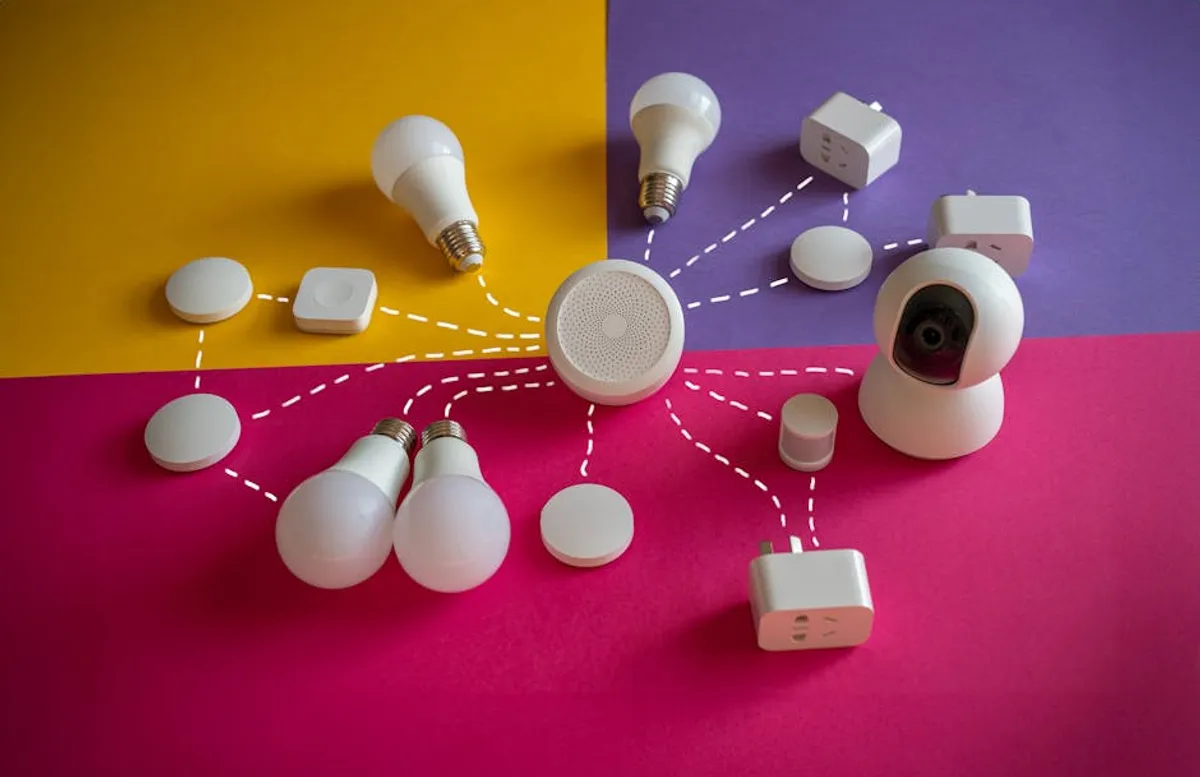
Entering the smart home ecosystem can feel daunting, given the vast array of devices and interoperability standards. For beginners, the primary goal should be seamless integration, intuitive control, and immediate functional benefit without complex setup procedures or significant financial outlay. The most effective smart home gadgets for new users prioritize simplicity, offer clear value, and often serve as accessible entry points into broader home automation.
How to Choose Your First Smart Home Gadgets
Selecting initial smart home devices requires focusing on foundational elements that deliver tangible benefits without overwhelming complexity. Prioritize gadgets that offer a straightforward installation process, require minimal configuration, and integrate with a widely supported smart home ecosystem. Consider devices that solve a specific problem or enhance a daily routine, such as automating lighting, managing climate, or providing basic security monitoring. Evaluate the device's compatibility with major platforms like Amazon Alexa, Google Home, or Apple HomeKit if you anticipate expanding your setup. Look for clear app interfaces, reliable Wi-Fi connectivity, and a strong community or manufacturer support for troubleshooting. Starting with a few well-chosen, easy-to-use devices ensures a positive initial experience and builds confidence for future expansions.
1. Smart Plugs (e.g., TP-Link Kasa Smart Plug Mini)
Smart plugs are among the simplest and most cost-effective entry points into home automation. These devices convert any standard electrical outlet into a smart outlet, allowing control of connected appliances and lamps via a smartphone app or voice commands. The TP-Link Kasa Smart Plug Mini stands out for its compact design, which avoids blocking adjacent outlets, and its reliable performance within the Kasa ecosystem. It requires no separate hub, connecting directly to your home Wi-Fi network.
Best For: Automating existing lamps, coffee makers, fans, or other small appliances without replacing the device itself.
Pros:
- Easy setup via a user-friendly app.
- Compact design does not obstruct other outlets.
- Allows for scheduling, timers, and remote control of non-smart devices.
- Compatible with Amazon Alexa and Google Home for voice control.
- Affordable entry point with immediate utility.
Cons:
- Limited to on/off functionality; no dimming or variable speed control.
- Requires a stable 2.4 GHz Wi-Fi connection.
- Does not provide energy monitoring in all models.
Verdict: An excellent foundational device for beginners due to its simplicity, low cost, and immediate impact on daily convenience. It introduces core smart home concepts like scheduling and remote control without demanding extensive technical knowledge.
2. Smart Light Bulbs (e.g., Philips Hue White)
Smart light bulbs offer an accessible way to control lighting remotely, set schedules, and even adjust brightness or color temperature. Philips Hue White bulbs are a strong contender for beginners because of their consistent performance and the brand's extensive ecosystem, even though the White series focuses on foundational white light control. While some Hue products require a bridge, many newer White bulbs offer Bluetooth connectivity for direct control, simplifying the initial setup for a single room or a few bulbs.
Best For: Gaining basic control over lighting in a single room or small apartment, setting mood, or establishing routines without complex wiring.
Pros:
- Effortless installation by screwing into existing fixtures.
- Bluetooth control for direct app access without a hub (for select models).
- Allows for dimming, scheduling, and remote on/off functionality.
- High reliability and integration with major smart home platforms.
- Provides energy efficiency benefits over traditional bulbs.
Cons:
- Full ecosystem features (like multi-room control or advanced routines) often require a Hue Bridge, adding cost.
- White-only bulbs lack the color-changing capabilities of more expensive smart bulbs.
- Initial cost per bulb is higher than traditional LED bulbs.
Verdict: A practical first step into smart lighting, offering significant convenience and energy savings. The option for Bluetooth control makes it particularly beginner-friendly, deferring the need for a hub until a user decides to expand their system.
3. Smart Speaker (e.g., Amazon Echo Dot)
A smart speaker serves as the central voice command interface for many smart home setups. The Amazon Echo Dot is a compact and affordable option that provides access to Alexa, Amazon's voice assistant. It allows users to play music, get news updates, set alarms, and, crucially, control compatible smart home devices with voice commands. Its small footprint makes it easy to place in any room.
Best For: Integrating voice control into a smart home, playing music, and accessing information hands-free. It acts as a gateway for controlling other smart devices.
Pros:
- Affordable and compact design.
- Access to Amazon Alexa's extensive capabilities and device integrations.
- Simple setup process via the Alexa app.
- Can control a wide range of smart home devices with voice commands.
- Acts as an intercom system between multiple Echo devices.
Cons:
- Audio quality is suitable for background music but not audiophile listening.
- Requires a consistent internet connection.
- Privacy concerns related to always-on listening.
Verdict: Essential for users looking to simplify smart home control through voice. Its low barrier to entry and broad compatibility make it an ideal starting point for building a voice-controlled ecosystem.
4. Video Doorbell (e.g., Ring Video Doorbell Wired)
A video doorbell enhances home security and convenience by allowing users to see and speak to visitors from anywhere via a smartphone. The Ring Video Doorbell Wired is a budget-friendly option that connects to existing doorbell wiring, providing continuous power and eliminating battery concerns. It offers 1080p HD video, two-way talk, and motion detection, sending alerts directly to a mobile device.
Best For: Enhancing front door security, monitoring package deliveries, and screening visitors without opening the door.
Pros:
- Constant power eliminates battery charging.
- 1080p HD video and two-way audio communication.
- Motion detection with customizable zones.
- Integration with Amazon Alexa for announcements and live view on Echo Show devices.
- Relatively simple installation for those with existing doorbell wiring.
Cons:
- Requires existing doorbell wiring for power.
- Advanced features like video history require a subscription plan (Ring Protect).
- Field of view may not cover all angles depending on installation.
Verdict: A practical security upgrade for beginners, offering peace of mind and convenience. Its wired connection simplifies ongoing maintenance, and core features are accessible without immediate subscription, making it a solid initial investment.
5. Smart Thermostat (e.g., Google Nest Thermostat)
Smart thermostats provide intelligent control over home heating and cooling, offering energy savings and enhanced comfort. The Google Nest Thermostat is designed for ease of use, featuring a clean interface and intuitive app control. It learns household patterns over time to optimize temperatures and can be controlled remotely. Its basic model provides essential smart features without the higher cost or complexity of more advanced learning thermostats.
Best For: Reducing energy consumption, maintaining comfortable indoor temperatures, and remote climate control.
Pros:
- Sleek design and intuitive touch controls.
- Remote control via the Google Home app.
- Energy-saving features like "Sense" for detecting presence and "Eco" mode.
- Compatible with most 24V HVAC systems (check compatibility online).
- Integration with Google Assistant and Amazon Alexa.
Cons:
- Lacks remote sensors for multi-zone temperature averaging, unlike pricier models.
- Some advanced HVAC systems may require professional installation.
- Learning capabilities are less extensive than the Nest Learning Thermostat.
Verdict: An accessible entry into smart climate control, offering significant energy savings and convenience. Its user-friendly interface and app make it suitable for beginners looking to optimize their home's heating and cooling.
6. Robot Vacuum (e.g., Eufy RoboVac 11S)
Robot vacuums automate floor cleaning, saving time and effort. The Eufy RoboVac 11S is a popular choice for beginners due to its quiet operation, slim profile, and effective cleaning performance on hard floors and low-pile carpets. It's a "set it and forget it" device with no complex mapping or smart home integrations beyond basic scheduling, making it highly approachable.
Best For: Hands-free daily floor cleaning, especially for pet owners or those with busy schedules.
Pros:
- Quiet operation compared to many robot vacuums.
- Slim design allows it to clean under furniture.
- Strong suction for its price point.
- Simple operation with remote control and scheduling.
- No complex app setup or Wi-Fi required for basic functions.
Cons:
- Lacks smart mapping or advanced navigation features.
- Can get stuck on thicker rugs or complex obstacles.
- No smart home integration (e.g., voice control) for this specific model.
Verdict: An excellent choice for beginners seeking automated cleaning without the complexities of advanced smart mapping or app-driven features. It delivers tangible time savings and cleaner floors with minimal user intervention.
7. Smart Security Camera (e.g., Wyze Cam v3)
Smart security cameras provide remote monitoring of indoor or outdoor spaces, enhancing home safety. The Wyze Cam v3 is an exceptionally affordable and feature-rich option for beginners. It offers 1080p HD color night vision, motion and sound detection, and local storage via a microSD card, alongside cloud storage options. Its compact size and magnetic base allow for versatile placement.
Best For: Affordable indoor or outdoor security monitoring, pet monitoring, or simply checking in on your home remotely.
Pros:
- Remarkably low price point for its feature set.
- 1080p HD video with impressive color night vision.
- Local storage option with microSD card.
- Motion and sound detection with alerts.
- IP65 weather resistance for outdoor use (with optional power adapter).
Cons:
- Requires a power outlet; not battery-powered.
- Cloud features (e.g., person detection, longer event recording) often require a subscription.
- Wi-Fi range can be a limitation for outdoor placement.
Verdict: A highly recommended starting point for smart home security. Its robust features at an accessible price make it an easy decision for anyone wanting to add monitoring capabilities without a significant investment.
8. Smart Door Lock (e.g., August Smart Lock Pro)
Smart door locks offer keyless entry and remote access control, enhancing security and convenience. The August Smart Lock Pro is unique because it retrofits over an existing deadbolt on the inside of the door, preserving the exterior lock and keys. This simplifies installation and allows for continued use of traditional keys. It offers auto-unlock, auto-lock, and guest access features, all controlled via a smartphone app.
Best For: Upgrading existing deadbolts to smart functionality, providing keyless entry, and managing access for family or guests.
Pros:
- Easy DIY installation over an existing deadbolt.
- Retains the use of original keys.
- Auto-lock and auto-unlock based on proximity.
- Ability to grant temporary or permanent virtual keys.
- Integrates with major smart home platforms (with Connect Wi-Fi bridge).
Cons:
- Requires the August Connect Wi-Fi bridge for remote access and smart home integration (often sold separately or in a bundle).
- Battery-operated, requiring periodic replacement.
- Does not replace the exterior lock, which some users prefer for a fully integrated look.
Verdict: An excellent choice for beginners due to its non-invasive installation and ability to keep existing keys. It introduces advanced access control features with a minimal learning curve, making it a practical security upgrade.
9. Smart Display (e.g., Google Nest Hub 2nd Gen)
A smart display combines the voice assistant capabilities of a smart speaker with a visual interface, making it easier to control devices, view information, and stream content. The Google Nest Hub (2nd Gen) offers a 7-inch screen that displays calendar events, weather, recipes, and live feeds from compatible smart cameras. It serves as a central control panel for Google Home devices and provides robust audio for its size.
Best For: Visual control of smart devices, quick access to information, streaming video/music, and digital photo frame functionality.
Pros:
- Intuitive touch screen interface for device control.
- Access to Google Assistant for voice commands and information.
- Can display live feeds from security cameras and video doorbells.
- Sleep Sensing technology (optional) for wellness tracking.
- Good audio quality for a compact device.
Cons:
- No built-in camera, which some users might prefer for video calls.
- Requires a consistent internet connection.
- Privacy concerns related to microphone and sleep-sensing features.
Verdict: A versatile hub for beginners, offering both auditory and visual interaction with their smart home. It simplifies device management and provides a central point for information and entertainment, making the smart home experience more engaging.
10. Door/Window Sensors (e.g., Aqara Door and Window Sensor)
Door and window sensors provide basic security by detecting when an entry point is opened or closed. These small, discreet devices are simple to install and integrate into a broader smart home system to trigger alerts, activate lights, or initiate other routines. The Aqara Door and Window Sensor is known for its compact size, long battery life, and reliable performance within the Aqara ecosystem, which can bridge to Apple HomeKit, Amazon Alexa, and Google Home via an Aqara Hub.
Best For: Basic security monitoring, automating lights when a door opens, or receiving alerts for unauthorized entry.
Pros:
- Extremely small and discreet design.
- Simple peel-and-stick installation.
- Long battery life (up to 2 years).
- Reliable detection of open/close states.
- Can trigger automations like turning on lights or sending notifications.
Cons:
- Requires an Aqara Hub (or compatible Zigbee hub) for full smart home integration.
- Does not provide motion detection or glass break detection.
- Limited to contact sensing only.
Verdict: An excellent, low-cost way to add an extra layer of security and automation to a beginner smart home. While it requires a hub, its simplicity and effectiveness in basic monitoring make it a valuable addition for enhancing peace of mind.
11. Smart Lighting Strips (e.g., Govee RGBIC LED Strip Lights)
Smart lighting strips offer decorative and ambient lighting options, allowing users to add color and dynamic effects to any space. Govee RGBIC LED Strip Lights are particularly beginner-friendly due to their direct Wi-Fi/Bluetooth connectivity (often hub-free), vibrant color output, and advanced "RGBIC" technology which allows multiple colors to be displayed on a single strip simultaneously. They are easy to install with adhesive backing.
Best For: Adding accent lighting, creating immersive entertainment setups, or enhancing room ambiance with customizable colors and effects.
Pros:
- Easy peel-and-stick installation.
- Vibrant RGBIC colors and dynamic lighting effects.
- Often connect directly via Wi-Fi/Bluetooth, no hub required.
- Music synchronization feature available in many models.
- Compatible with Amazon Alexa and Google Home for voice control.
Cons:
- Requires a power outlet for each strip.
- Adhesive may not be permanent on all surfaces.
- The quality and brightness can vary between brands and models.
Verdict: A fun and impactful smart home gadget for beginners looking to personalize their living space with dynamic lighting. Its ease of installation and direct connectivity make it a straightforward way to introduce advanced lighting control.
12. Smart Button (e.g., Flic 2 Smart Button)
Smart buttons provide a physical, tactile way to trigger smart home routines and control devices without needing a phone or voice command. The Flic 2 Smart Button is a versatile, programmable button that can execute multiple actions based on single press, double press, or long press. It connects via Bluetooth to a compatible hub (like the Flic Hub Mini) or directly to a smartphone, then integrates with various smart home platforms.
Best For: Quick, convenient control of favorite smart home routines, such as turning off all lights, activating a "movie night" scene, or controlling music playback.
Pros:
- Highly customizable with multiple press actions.
- Physical control without needing a phone or voice.
- Long battery life.
- Integrates with a wide range of smart home services and devices.
- Portable design for placement anywhere.
Cons:
- Requires a Flic Hub Mini for reliable multi-device integration and remote access.
- Relies on Bluetooth, which has limited range.
- Initial setup and programming can take a few minutes to configure desired actions.
Verdict: An excellent addition for beginners who appreciate physical controls or want to simplify complex routines. It offers a tangible, immediate way to interact with smart home systems, reducing reliance on apps or voice commands for frequently used actions.
Evaluating Long-Term Value and Scalability
Once you've introduced a few smart home gadgets, consider how they integrate and scale. Long-term value in a beginner smart home setup stems from devices that reliably perform their core function, integrate with a chosen ecosystem (e.g., Google Home, Amazon Alexa, Apple HomeKit), and offer a clear path for expansion. Prioritize devices that use open standards or have broad compatibility. Evaluate how well new devices communicate with existing ones and if a central hub or bridge becomes necessary for advanced automations. Look for manufacturers that provide consistent software updates, security patches, and responsive customer support, ensuring your initial investments remain functional and secure as your smart home evolves.
Frequently Asked Questions
Are smart home gadgets difficult to install for beginners?
Many beginner-friendly smart home gadgets are designed for DIY installation, requiring no special tools or electrical knowledge. Devices like smart plugs, smart bulbs, and most security cameras simply plug in or screw into existing fixtures and connect via an app. More complex installations, such as smart thermostats or wired doorbells, may require basic wiring knowledge or professional assistance.
Do I need a smart home hub to get started?
Not necessarily. Many entry-level smart devices, particularly smart plugs and some smart bulbs, connect directly to your home Wi-Fi network or via Bluetooth, requiring only a smartphone app for control. A smart speaker (like an Echo Dot or Nest Mini) can act as a hub for voice control. Dedicated hubs become more useful as you expand your system, enabling more complex automations, broader compatibility, and local control.
What about privacy and security concerns with smart home devices?
Privacy and security are valid concerns. Choose reputable brands that have a track record of robust security practices, including data encryption and regular software updates. Always use strong, unique passwords for your smart home accounts and enable two-factor authentication where available. Be mindful of microphone and camera placements, and review privacy policies to understand how your data is collected and used.
How much do smart home gadgets cost?
The cost varies significantly. Beginner-friendly devices like smart plugs and basic smart bulbs can start from $15-$30 each. Smart speakers and entry-level security cameras typically range from $30-$70. More advanced devices like smart thermostats or video doorbells can be $100-$250. It's possible to start with a few key devices for under $100 and gradually expand your system.
Can I mix and match different brands of smart home gadgets?
Yes, to a certain extent. Many smart home devices are compatible with major ecosystems like Amazon Alexa, Google Home, and Apple HomeKit, allowing you to control devices from different brands through a single voice assistant or app. However, deeper integrations and complex automations often work best within a single brand's ecosystem or with devices that use the same underlying communication protocol (e.g., Zigbee, Z-Wave) and a compatible hub.